

Move Shoot Move NOMAD EQ Wedge / Latitude Base
Availability: Sales of this item are currently suspended on our site due to ongoing tariff uncertainties. We do not know when this will be back in stock again or at what price.
Contiguous US Customers:
All items we sell ship for free within the Contiguous US. Shipping will be via the cheapest shipping method which will vary depending on the items in your order. During checkout, you may also be shown other optional faster shipping choices.
US Customers in Hawaii and Alaska:
Free shipping applies to almost all products. A few large telescopes and mounts are excluded from this free shipping offer. For these items, please contact us to obtain a shipping quote before you check out using the online shopping cart.
International Customers:
Free shipping does not apply to international orders. During check-out, you will be presented with several shipping choices and costs. However, the export of some items may be restricted outside the US due to size or manufacturer restrictions.
Move Shoot Move NOMAD Wedge for precise polar alignment
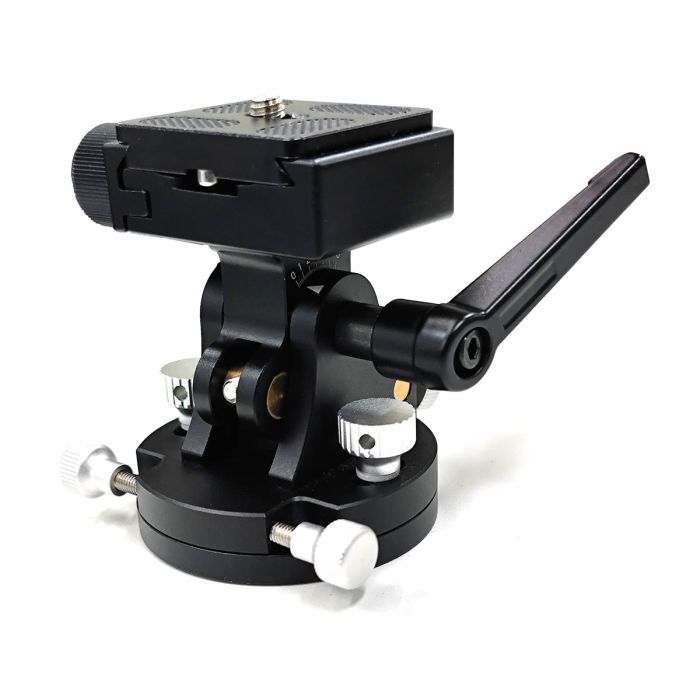
The MSM Wedge is designed for precise polar alignment, similar to a ballhead but with finer adjustment capabilities. It features four knobs and one handle, for multi-directional adjustments, allowing you to set your tracker or camera at various angles. The top of the Quick-Release Plate has a standard 1/4"-20 threaded screw so that you can attach anything with a 1/4"-20 threaded hole.
- Knob A locks or unlocks the Quick-Release Plate on the top
- Knob B controls the altitude adjustment.
- Handle locks and unlocks the altitude adjustment when turned in the direction of Knob B or the opposite direction, respectively. Simply pull the handle out to adjust its direction and this action will not affect the locked or unlocked status.
- Knob C & Knob D adjust the azimuth for precise left and right movements in tiny increments.
The wedge can securely mount the Nomad Star Tracker without more tools. Made entirely of black CNC-milled aluminum alloy, it ensures maximum stability and durability.
Specifications:
- Material: CNC-Milled Aluminum Alloy
- Adjustment: 0°-60°
- Compatibility: Any Rig with ARCA Swiss on the Bottom
- Total height: 3.03 in (7.7 cm)
- Base diameter: 2.32 in (5.9 cm)
- Net weight: 0.70 lbs (0.32 kg)
- Maximum load: 11 lbs (5 kg)
- Arca Swiss Plate: Included
- Screw Hole on the bottom: 3/8 Screw Hole
Setting up the Wedge
1. Mount the Wedge on the Tripod: Ensure the wedge is tightly mounted to the tripod for stability.
2. Attach the Quick-Release Plate: Screw the Quick-Release Plate into the bottom of your rig (e.g., camera, MSM Star Tracker, or others.) Tip: Nomad Tracker has a built-in arca plate, so it can pass this step.
3. Secure the Rig: Loosen the Quick-Release Adapter and slide in the Quick-Release Plate, then tighten it.
4. Adjust the Wedge:
Tilting:
- Loosen the handle (turn in the opposite direction of Knob B) to unlock altitude adjustment.
- Tilt the wedge by rotating Knob B, then lock it by turning the handle towards Knob B.
- Tip: Slight tilting is possible even when the handle is locked, the main purpose of this handle is to stabilize the whole wedge but not totally lock it.
Panning:
- Use Knob C and Knob D to adjust the azimuth.
- To pan the wedge left or right, turn both knobs towards you or outwards simultaneously, which means you need to rotate both screws in the same direction to pan the wedge
- Tip: Continue turning the knobs until one reaches its limit; this will allow further panning.
- To lock the wedge in place, turn both knobs at the same time towards the center.
- To unlock, turn both knobs simultaneously outwards.
By following these steps, you can ensure precise adjustments for optimal positioning of your tracker or camera. The combination of altitude and azimuth controls allows for highly accurate alignment, making your astrophotography setup both versatile and reliable.
| Product Banner Type | new |
|---|---|
| Free Shipping Graphic | Free US Shipping |
| Hide Found a better Shipped Price on Frontend? | No |

Move Shoot Move NOMAD Wedge for precise polar alignment
The MSM Wedge is designed for precise polar alignment, similar to a ballhead but with finer adjustment capabilities. It features four knobs and one handle, for multi-directional adjustments, allowing you to set your tracker or camera at various angles. The top of the Quick-Release Plate has a standard 1/4"-20 threaded screw so that you can attach anything with a 1/4"-20 threaded hole.
- Knob A locks or unlocks the Quick-Release Plate on the top
- Knob B controls the altitude adjustment.
- Handle locks and unlocks the altitude adjustment when turned in the direction of Knob B or the opposite direction, respectively. Simply pull the handle out to adjust its direction and this action will not affect the locked or unlocked status.
- Knob C & Knob D adjust the azimuth for precise left and right movements in tiny increments.
The wedge can securely mount the Nomad Star Tracker without more tools. Made entirely of black CNC-milled aluminum alloy, it ensures maximum stability and durability.
Specifications:
- Material: CNC-Milled Aluminum Alloy
- Adjustment: 0°-60°
- Compatibility: Any Rig with ARCA Swiss on the Bottom
- Total height: 3.03 in (7.7 cm)
- Base diameter: 2.32 in (5.9 cm)
- Net weight: 0.70 lbs (0.32 kg)
- Maximum load: 11 lbs (5 kg)
- Arca Swiss Plate: Included
- Screw Hole on the bottom: 3/8 Screw Hole
Setting up the Wedge
1. Mount the Wedge on the Tripod: Ensure the wedge is tightly mounted to the tripod for stability.
2. Attach the Quick-Release Plate: Screw the Quick-Release Plate into the bottom of your rig (e.g., camera, MSM Star Tracker, or others.) Tip: Nomad Tracker has a built-in arca plate, so it can pass this step.
3. Secure the Rig: Loosen the Quick-Release Adapter and slide in the Quick-Release Plate, then tighten it.
4. Adjust the Wedge:
Tilting:
- Loosen the handle (turn in the opposite direction of Knob B) to unlock altitude adjustment.
- Tilt the wedge by rotating Knob B, then lock it by turning the handle towards Knob B.
- Tip: Slight tilting is possible even when the handle is locked, the main purpose of this handle is to stabilize the whole wedge but not totally lock it.
Panning:
- Use Knob C and Knob D to adjust the azimuth.
- To pan the wedge left or right, turn both knobs towards you or outwards simultaneously, which means you need to rotate both screws in the same direction to pan the wedge
- Tip: Continue turning the knobs until one reaches its limit; this will allow further panning.
- To lock the wedge in place, turn both knobs at the same time towards the center.
- To unlock, turn both knobs simultaneously outwards.
By following these steps, you can ensure precise adjustments for optimal positioning of your tracker or camera. The combination of altitude and azimuth controls allows for highly accurate alignment, making your astrophotography setup both versatile and reliable.
| Product Banner Type | new |
|---|---|
| Free Shipping Graphic | Free US Shipping |
| Hide Found a better Shipped Price on Frontend? | No |