

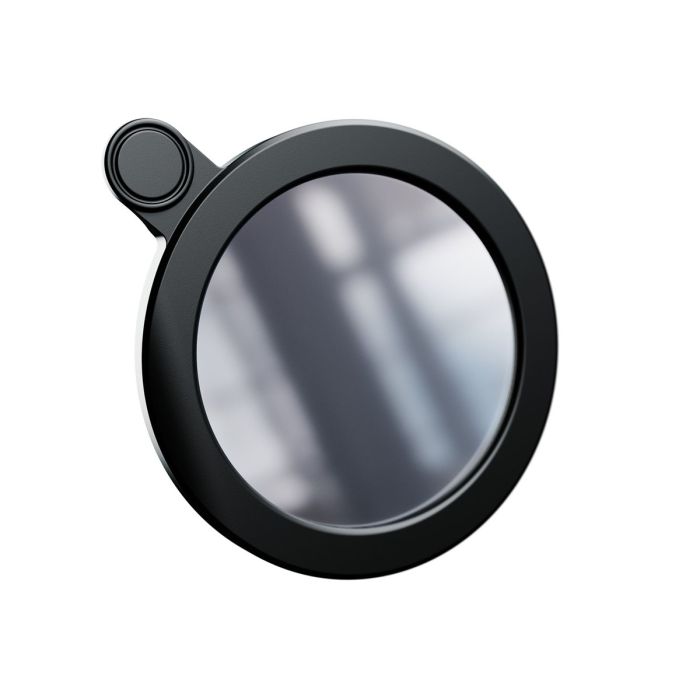
Vaonis Solar Filter for Vespera
Ships by Next Business Day
Contiguous US Customers:
All items we sell ship for free within the Contiguous US. Shipping will be via the cheapest shipping method which will vary depending on the items in your order. During checkout, you may also be shown other optional faster shipping choices.
US Customers in Hawaii and Alaska:
Free shipping applies to almost all products. A few large telescopes and mounts are excluded from this free shipping offer. For these items, please contact us to obtain a shipping quote before you check out using the online shopping cart.
International Customers:
Free shipping does not apply to international orders. During check-out, you will be presented with several shipping choices and costs. However, the export of some items may be restricted outside the US due to size or manufacturer restrictions.
Astronomer by night, astronomer by day! Observe the closest star to Earth during the day with the Vespera solar filter. The filter allows you to observe sunspots (dark spots) that show the intensity of the Sun’s activity.
Photograph the Sun with Vespera
The Solar Mode allows you to observe the Sun in almost real-time using the live display*. Capture photos at any time from the Observation tab of the Singularity mobile app.
Take several shots at different times of the day, week or month and compare your photos. Witness how the Sun’s activity changes with the appearance or disappearance of sunspots. These can have a life span of several days, more rarely several weeks.
Automatic video recording for solar/planetary observation is not yet offered in Singularity. To make an animation, retrieve your photos in jpg format from Vespera’s internal memory and put your photos together using photo/gif animation software.
*Continuous display of photos with a unit exposure time of 250µs
Observe safely
The filter is made of a metalized foil with a dimming effect. It will reduce the amount of light and allow you to observe the Sun in a way that is safe for your instrument. You will be guided through every step of your adventure by the Solar Mode of the Vaonis Singularity app, to ensure the observation runs smoothly and that you and your instrument are safe.
Warnings
- Your Vespera station should never be pointed towards the sun unless a solar filter is installed.
- You can only use Vespera to observe the sun using the Solar Mode feature of the Singularity app and the solar filter specially designed by Vaonis. The use of any other means to observe the Sun (pointing by coordinates, pointing by hand, use of any other filter, etc.) would void your warranty in the event of damage to your equipment. (see Warranties below).
- Never look directly at the sun without adequate protection. Direct observation of the sun without protection and without a solar filter, even for a short time, can lead to serious eye burns and potential loss of vision or even blindness.
- Do not attempt to open the lens ring that contains the filter.
Instructions for use
Introduction: In order to use the Solar Mode mode, your instrument must have been used at least once at night for the solar pointing to work.
Designed specifically for Vespera, the filter fits easily and discreetly into the optical arm. During daylight hours and with the Vespera lens protected from direct sunlight, remove the standard lens ring and replace it with the solar filter until you hear a click. The fixing ring that holds the solar filter is equipped with an electronic card that allows Vespera to detect it.
To verify that the solar filter is properly positioned, connect Vespera to your mobile device and launch the Singularity app. In the Space Center, click on Solar Mode and follow the step by step guide.
Maintenance tips
- The filter is delivered in a transparent storage box. Store the filter in its box after each use to avoid dust build-up.
- If you notice any streaks or dust, gently clean the filter with an anti-static cloth, feather duster or air blower.
- To avoid damaging the surface coating, do not spray the filter with cleaning agents, but use a mist instead.
Specifications:
- Weight: 0.1 kg
- Net weight: 10 g (0.35 oz)
- Net Dimensions: Thickness: 0.6 cm (0.24 in), Width: 7.80 cm (3.07 in)
- Colors: Black, Metallic Gray
- Materials: Metalized foil, Plastic
- Package Weight: 50 g (1.76 oz)
| Free Shipping Graphic | Free US Shipping |
|---|---|
| Hide Found a better Shipped Price on Frontend? | No |

Astronomer by night, astronomer by day! Observe the closest star to Earth during the day with the Vespera solar filter. The filter allows you to observe sunspots (dark spots) that show the intensity of the Sun’s activity.
Photograph the Sun with Vespera
The Solar Mode allows you to observe the Sun in almost real-time using the live display*. Capture photos at any time from the Observation tab of the Singularity mobile app.
Take several shots at different times of the day, week or month and compare your photos. Witness how the Sun’s activity changes with the appearance or disappearance of sunspots. These can have a life span of several days, more rarely several weeks.
Automatic video recording for solar/planetary observation is not yet offered in Singularity. To make an animation, retrieve your photos in jpg format from Vespera’s internal memory and put your photos together using photo/gif animation software.
*Continuous display of photos with a unit exposure time of 250µs
Observe safely
The filter is made of a metalized foil with a dimming effect. It will reduce the amount of light and allow you to observe the Sun in a way that is safe for your instrument. You will be guided through every step of your adventure by the Solar Mode of the Vaonis Singularity app, to ensure the observation runs smoothly and that you and your instrument are safe.
Warnings
- Your Vespera station should never be pointed towards the sun unless a solar filter is installed.
- You can only use Vespera to observe the sun using the Solar Mode feature of the Singularity app and the solar filter specially designed by Vaonis. The use of any other means to observe the Sun (pointing by coordinates, pointing by hand, use of any other filter, etc.) would void your warranty in the event of damage to your equipment. (see Warranties below).
- Never look directly at the sun without adequate protection. Direct observation of the sun without protection and without a solar filter, even for a short time, can lead to serious eye burns and potential loss of vision or even blindness.
- Do not attempt to open the lens ring that contains the filter.
Instructions for use
Introduction: In order to use the Solar Mode mode, your instrument must have been used at least once at night for the solar pointing to work.
Designed specifically for Vespera, the filter fits easily and discreetly into the optical arm. During daylight hours and with the Vespera lens protected from direct sunlight, remove the standard lens ring and replace it with the solar filter until you hear a click. The fixing ring that holds the solar filter is equipped with an electronic card that allows Vespera to detect it.
To verify that the solar filter is properly positioned, connect Vespera to your mobile device and launch the Singularity app. In the Space Center, click on Solar Mode and follow the step by step guide.
Maintenance tips
- The filter is delivered in a transparent storage box. Store the filter in its box after each use to avoid dust build-up.
- If you notice any streaks or dust, gently clean the filter with an anti-static cloth, feather duster or air blower.
- To avoid damaging the surface coating, do not spray the filter with cleaning agents, but use a mist instead.
Specifications:
- Weight: 0.1 kg
- Net weight: 10 g (0.35 oz)
- Net Dimensions: Thickness: 0.6 cm (0.24 in), Width: 7.80 cm (3.07 in)
- Colors: Black, Metallic Gray
- Materials: Metalized foil, Plastic
- Package Weight: 50 g (1.76 oz)
| Free Shipping Graphic | Free US Shipping |
|---|---|
| Hide Found a better Shipped Price on Frontend? | No |

Vaonis Solar Filter for Vespera # AC021