

ZWO ASIAIR Plus 256GB Wi-Fi Smart Camera Controller

Ships by Next Business Day
Contiguous US Customers:
All items we sell ship for free within the Contiguous US. Shipping will be via the cheapest shipping method which will vary depending on the items in your order. During checkout, you may also be shown other optional faster shipping choices.
US Customers in Hawaii and Alaska:
Free shipping applies to almost all products. A few large telescopes and mounts are excluded from this free shipping offer. For these items, please contact us to obtain a shipping quote before you check out using the online shopping cart.
International Customers:
Free shipping does not apply to international orders. During check-out, you will be presented with several shipping choices and costs. However, the export of some items may be restricted outside the US due to size or manufacturer restrictions.
- Wireless control of your telescope setup via phone or tablet
- Controls and powers compatible cameras, mounts, focusers, filter wheels, and more
- Fully automate your imaging sessions with advanced scheduling tools
- Handles polar alignment, plate solving, guiding, and autofocus
- 256GB high-speed internal storage
- Beginner-friendly interface with step-by-step instructions
- Requires 12V DC power supply (not included)
ZWO ASIAIR Plus: All-in-One Telescope Control
The ZWO ASIAIR Plus is a smart controller that simplifies astrophotography by wirelessly managing your entire telescope setup. Trusted by astrophotographers worldwide, it builds on previous ASIAIR models with the power to control ZWO cameras, ZWO electronic automatic focusers, ZWO guide cameras, ZWO filter wheels, compatible mounts, dew heaters, and more, right from your smartphone or tablet!
ZWO ASIAIR Plus Review & Tutorial
In this video, Agena Astro affiliate Peter Zelinka covers the key features and setup of the ZWO ASIAIR Plus.
ZWO ASIAIR Plus Highlights
Ultra-Portable & Compact
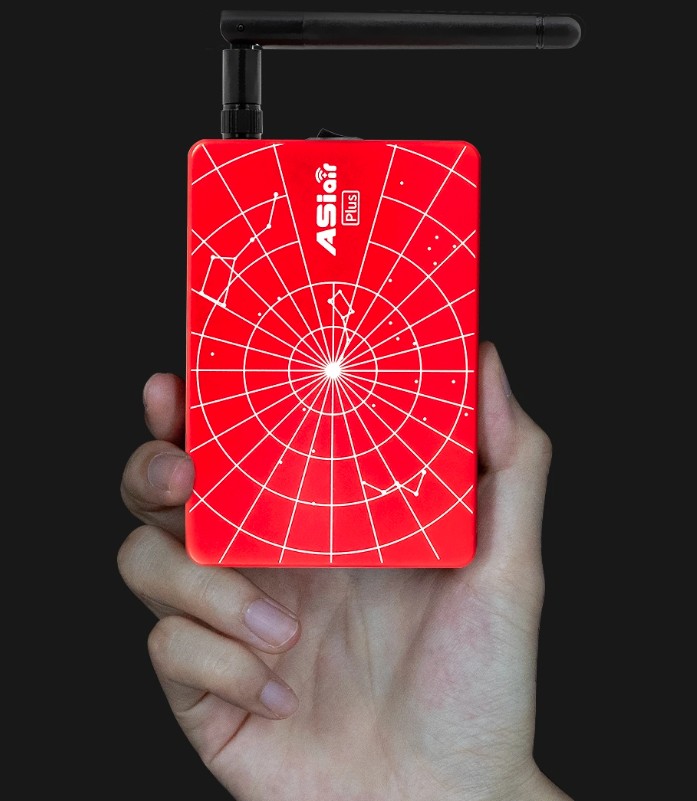
The ASIAIR Plus is incredibly compact and lightweight, measuring just 102 x 70 x 26.5 millimeters and weighing only 0.5 lb (228 grams). It’s 24% thinner and 13% lighter than the previous ASIAIR Pro, making it easier than ever to take it anywhere your telescope goes.
256GB Internal Storage
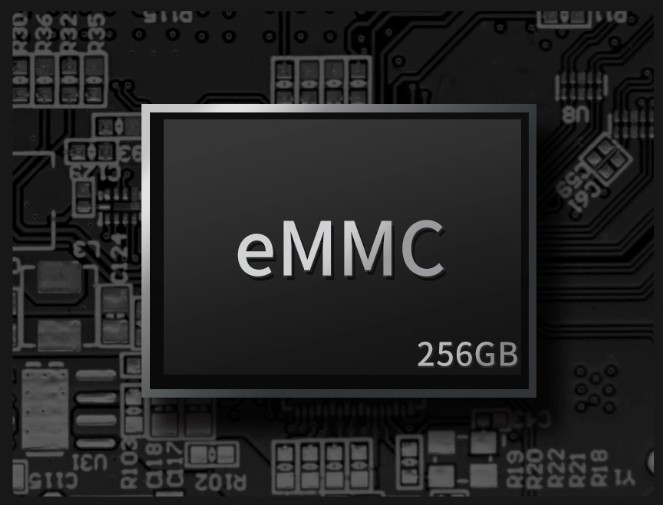
The ASIAIR Plus features 256GB of onboard eMMC storage, giving you plenty of space to save multiple nights of imaging before needing to offload data to your computer.
It also includes a built-in Recovery Mode that automatically detects faults and restores the system if the ASIAIR Plus ever fails to boot, keeping your images protected.
Strong WiFi Antenna
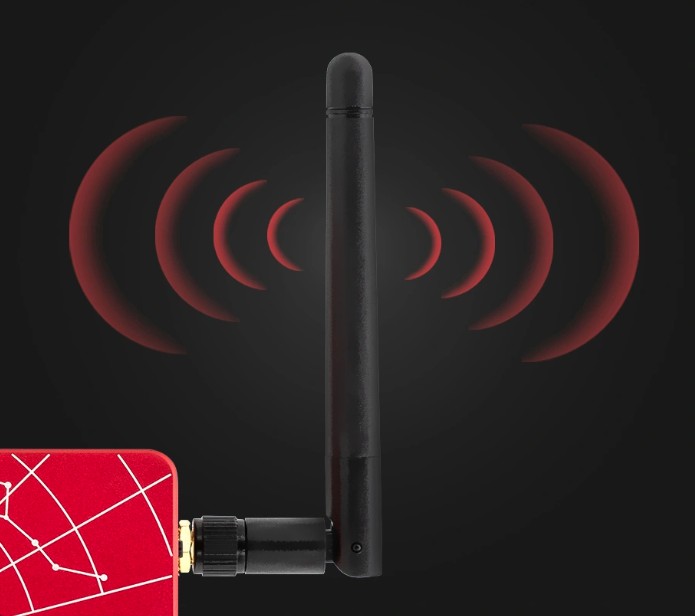
The upgraded WiFi antenna enables a strong connection from up to 65 feet away (20 meters). Image from the comfort of your home or car while your telescope captures the cosmos!
Ultimate Connectivity for Astrophotography
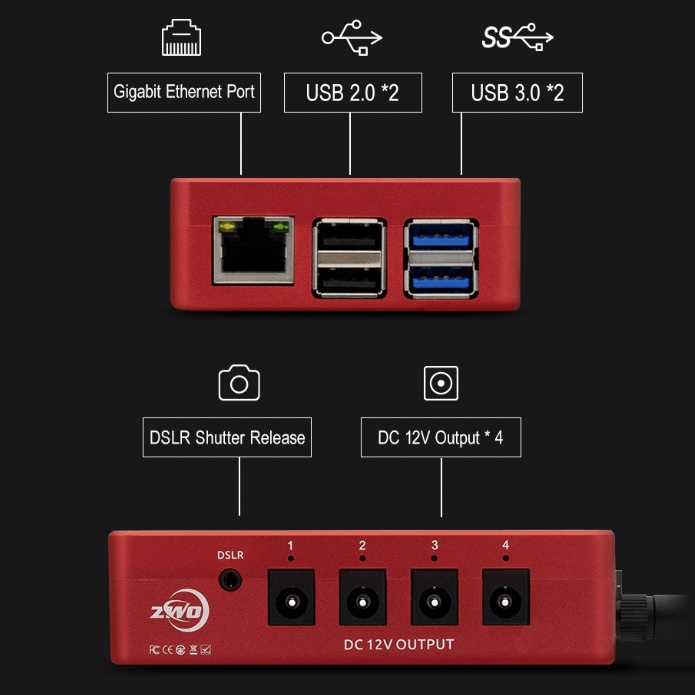
With multiple USB ports, a dedicated DSLR control port, and four 12V power outputs, the ASIAIR Plus lets you connect and control nearly every device in your imaging rig! From cameras and mounts to focusers, filter wheels, and dew heaters, using a single compact hub.
Advanced Control Made Easy
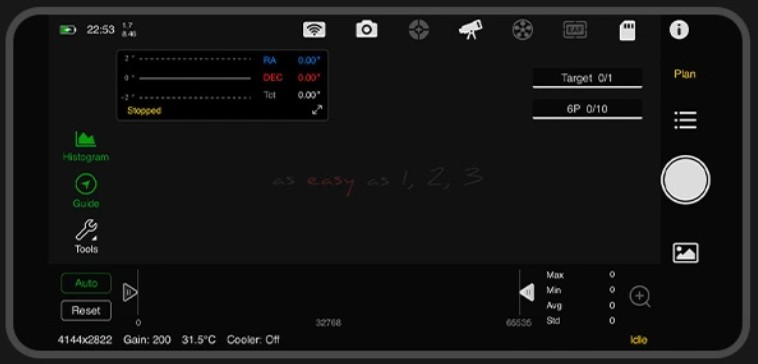
The ASIAIR Plus combines powerful automation with user-friendly controls, making astrophotography easier and more efficient. It handles complex tasks like polar alignment, plate solving, guiding, and autofocus with precision. This means you spend less time fiddling with gear and more time capturing the night sky!
Paired with the intuitive ASIAIR app (available for both iOS and Android), your phone or tablet becomes a full-featured control center. Firmware updates are easy, too—just tap to install right in the app. No cables or complicated downloads required.
When your imaging session is done, the ASIAIR Plus can automatically return your mount to its home position and power itself down—no need to stay up late babysitting your gear!
Monitor All Your Gear in Real Time
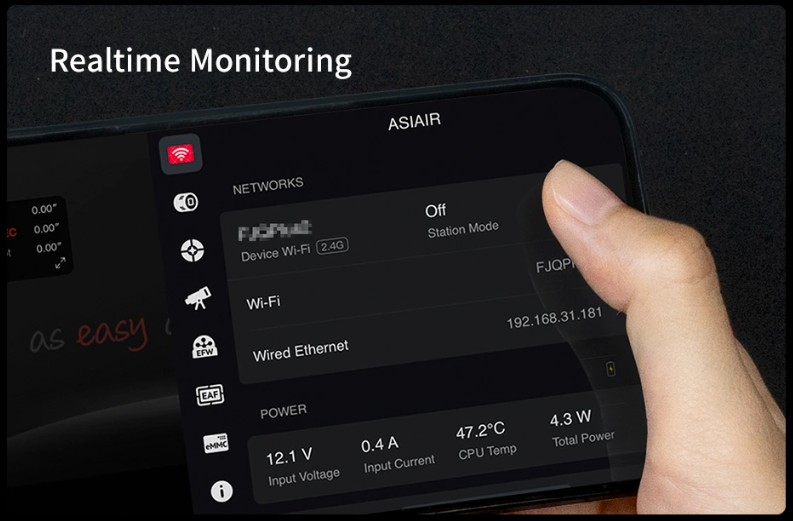
The ZWO ASIAIR Plus gives you real-time monitoring of your entire imaging setup. You can view live image downloads, check guiding performance, adjust focus, and control your mount, camera, filter wheel, and more! This allows you to catch issues fast and make adjustments on the fly. With the ASIAIR Plus, you will spend less time troubleshooting and more time capturing data.
Plan Your Shots with the Built-In Sky Atlas
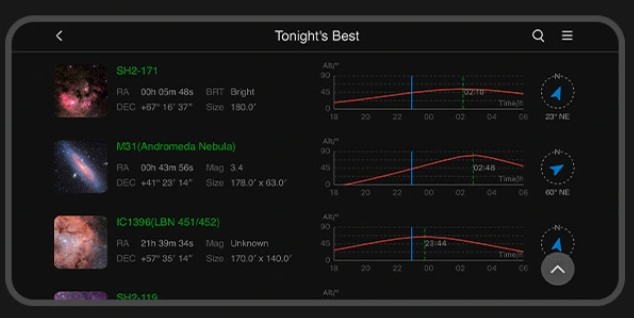
The ASIAIR Plus includes a powerful sky atlas—an interactive, real-time star map that displays what’s visible in the night sky from your location. It overlays your telescope and camera’s field of view directly onto the map, allowing you to preview your framing before moving your scope. It takes the guesswork out of framing, so you can plan and capture better-aligned, better-framed shots every time.
Behind the sky atlas is a fully searchable object database, packed with celestial catalogs including the Messier, NGC, and Sharpless objects. You can filter targets by catalog, object type, or pick from a list of the best objects visible tonight based on your exact time and location. Once you’ve selected a target, simply tap “Go” and the ASIAIR will automatically slew and center your mount—no manual entry or guesswork needed.
Effortless Polar Alignment
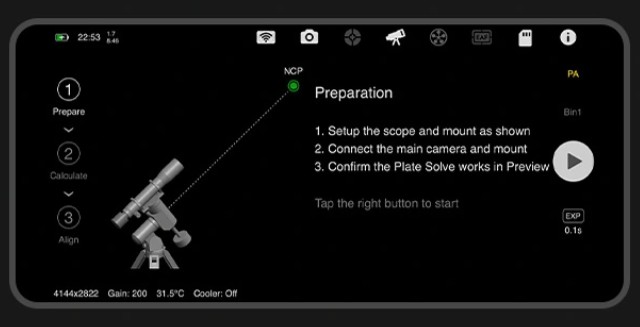
he ZWO ASIAIR Plus makes polar alignment fast, easy, and accurate—even if you’ve never done it before. Using your main imaging camera, the app guides you through a step-by-step polar alignment process that caters to both the northern and southern hemispheres. No additional tools or polar scopes needed.
Here’s how it works: the ASIAIR Plus captures an image using your main camera and plate solves it to determine exactly where your telescope is pointing in the night sky based on the stars in that image. It then automatically rotates the mount’s right ascension (RA) axis by 60 degrees, takes a second image, and plate solves again. By comparing the two images, it accurately calculates your polar alignment error. Next, the app guides you step-by-step as you use your mount's altitude and azimuth bolts to adjust its position to achieve precise alignment.
You don’t even need a clear view of your celestial pole. The ASIAIR can polar align from up to 30 degrees away from the pole, making it ideal for obstructed backyards.
Integrated Autoguiding with Advanced Features
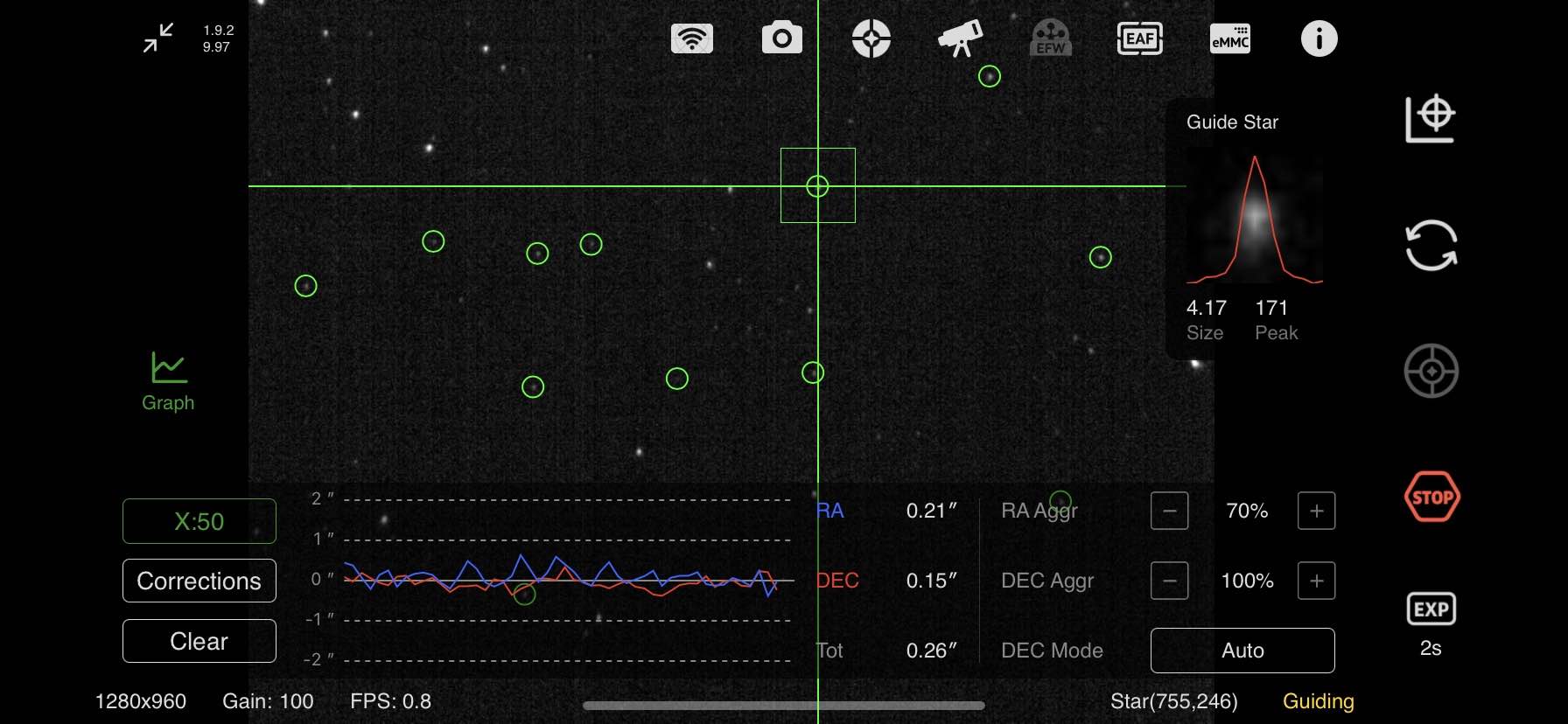
If you're used to PHD2, you'll feel right at home with the ASIAIR Plus. Its built-in guiding system includes many of the same powerful features, except built right into ZWO’s own ASIAIR app. You get a live mini guiding graph always visible on the main imaging screen, so you can monitor performance in real time while capturing data. Dithering between sub-exposures is fully automated, helping reduce noise and improve image quality.
For those who like to fine-tune their results, the ASIAIR lets you adjust advanced guiding parameters like RA and Dec aggression, calibration steps, and more.
Precise Focus with ZWO’s Electronic Automatic Focuser
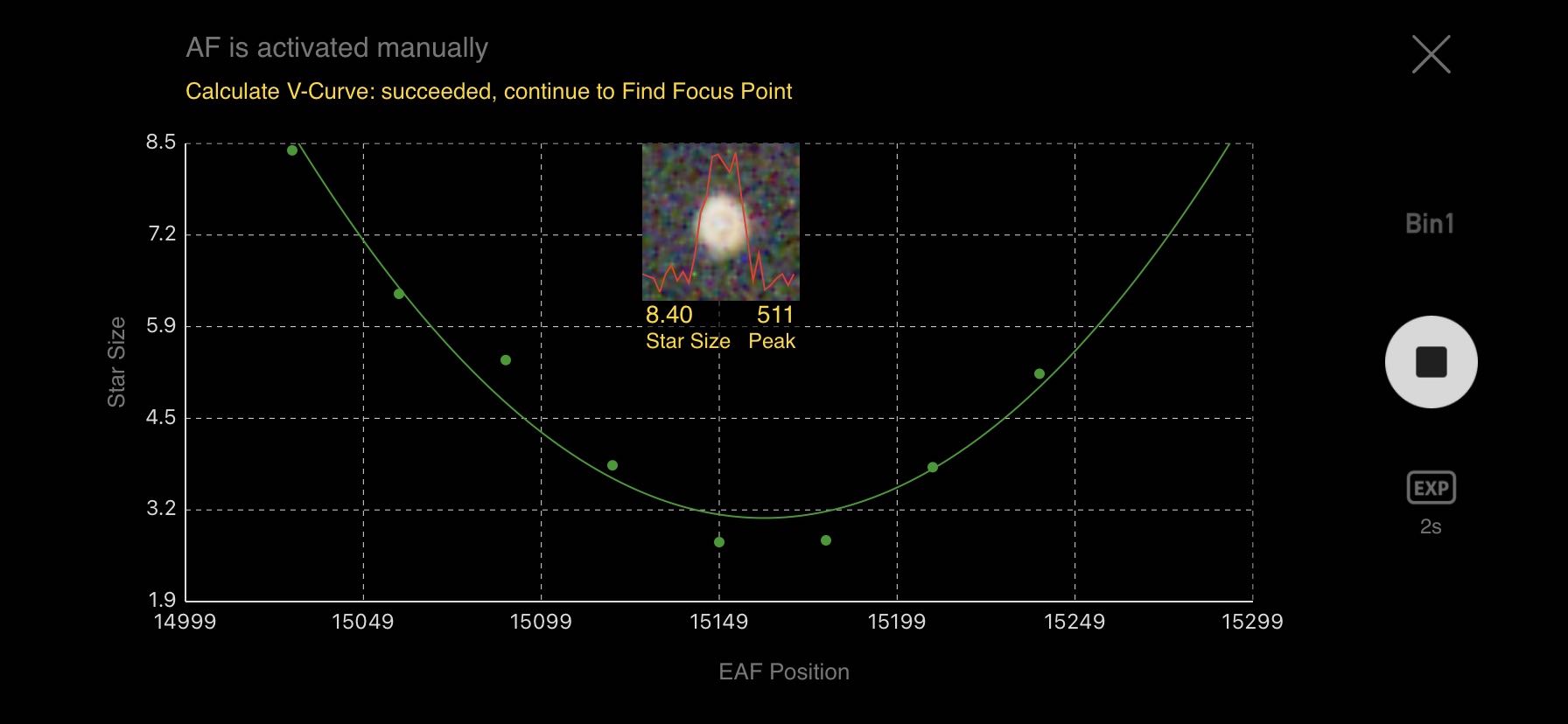
If you own a ZWO Electronic Automatic Focuser (EAF), the ASIAIR Plus lets you fully automate focusing through the ASIAIR app. It works by moving the focuser in and out while capturing images to create a V-curve. This curve helps the ASIAIR calculate the sharpest focus point with pinpoint accuracy, so your telescope delivers crisp, clear images every time.
The app also lets you adjust advanced autofocus settings like micron step size and backlash compensation. This gives you full control over the focuser’s movement, allowing you to match your equipment perfectly. This level of control helps reduce focus hunting, which once again saves you time!
Note: The ASIAIR Plus currently supports only ZWO’s EAF units. It is not compatible with third-party autofocusers.
Intelligent Capturing Modes
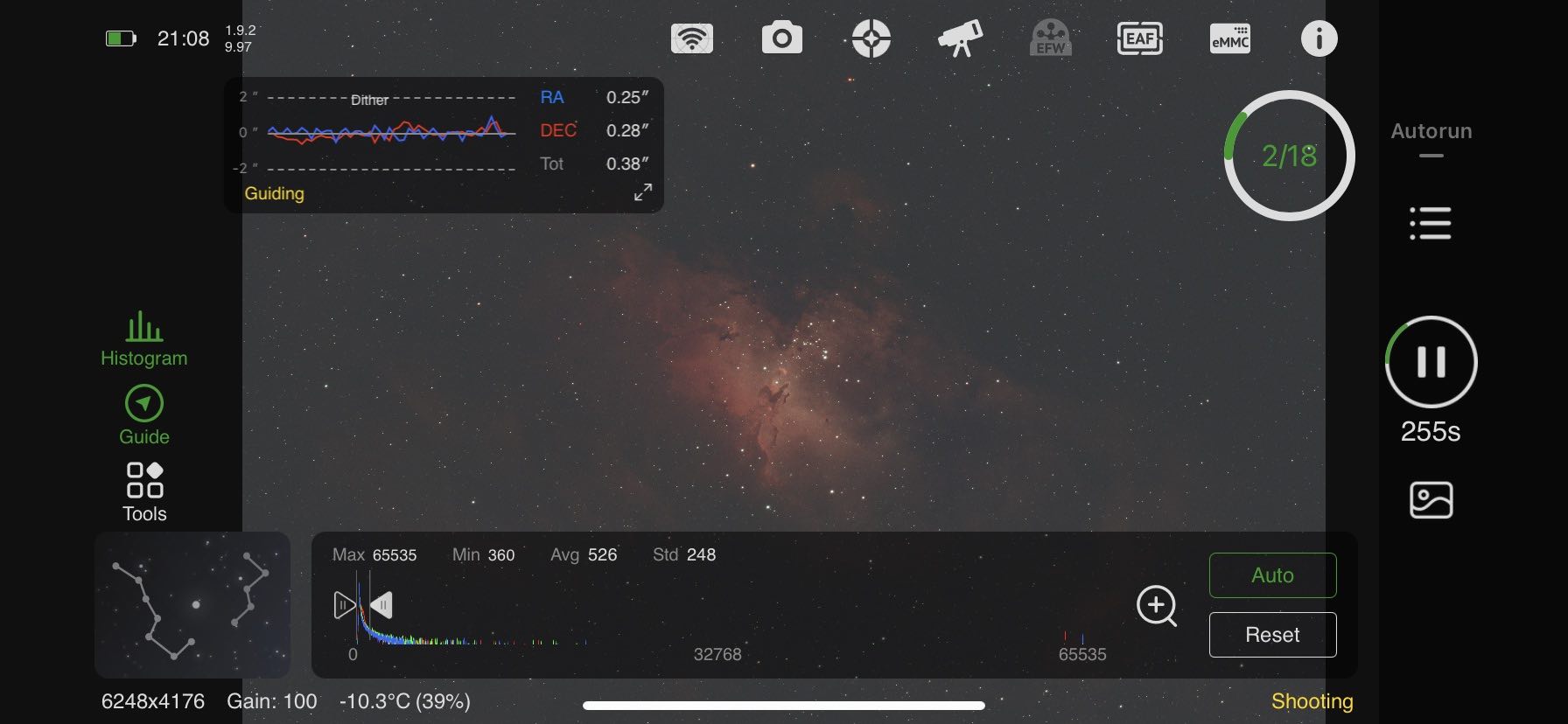
The ZWO ASIAIR Plus offers four smart capture modes to simplify your astrophotography.
With Autorun and Plan, you simply set it up and let it run. Autorun completes a full imaging sequence with automatic filter changes and meridian flips, while Plan manages multiple targets in one night, handling slewing, focusing, guiding, and imaging all on its own.
Live mode stacks images in real time, and Video mode captures high-frame-rate clips with selectable regions of interest for planetary and lunar imaging. The ASIAIR app makes capturing stunning astrophotography effortless, giving you more time to enjoy the night sky.
Frequently Asked Questions About the ASIAIR Plus
How do you power the ASIAIR Plus?
The ZWO ASIAIR Plus requires a 12V DC power supply with a 5.5x2.1mm male plug, capable of providing between 2A and 5A. ZWO recommends using a power source rated between 11V and 15V at 2A–5A. For safety, the device won’t power on if the voltage drops below 9V or exceeds 15V.
You can use ZWO’s AC adapter (sold separately) or your own compatible DC power supply. The ASIAIR Plus includes 5.5x2.1mm male cables for easy connection to sources like cigarette lighter adapters or field battery packs.
What is the WiFi range on the ASIAIR Plus?
Thanks to its upgraded external WiFi antenna, the ASIAIR Plus can maintain a stable wireless connection up to about 60 feet (20 meters). This improvement lets you comfortably control your astrophotography setup from your tent or car, though actual range may vary depending on your environment.
What are the options for built-in and external data storage?
The ASIAIR Plus includes 256GB of internal eMMC storage—enough for most imaging sessions without extra drives. About 12GB is used by the system and its Sky Atlas, leaving plenty of room for your photos. You can transfer images to your computer using a USB-C to USB-A cable (USB-C to USB-C cables aren’t supported).
If you need more storage, you can also use external USB flash drives or hard drives up to 1TB (512GB recommended), formatted as NTFS, FAT32, or exFAT.
How do you export images from the ASIAIR Plus to your computer?
The easiest way is to connect the ASIAIR Plus directly to your computer with a USB-C to USB-A cable—it will appear as an external drive for simple file drag-and-drop. Other options include using a USB flash drive or enabling Station Mode to transfer files over WiFi (though this is slower).
Does the ASIAIR app run on Mac or PC?
Owners of M1 and M2 Macs can now run the ASIAIR app natively from the App Store, though it’s not officially verified for macOS yet. Older Intel Macs need Android emulators like Bluestacks, which are unsupported and may be unstable.
On Windows PCs, you’ll also need an Android emulator like Bluestacks to run the ASIAIR app, but this method isn’t officially supported and may not work perfectly.
How do you attach the ASIAIR Plus to your telescope or mount?
The ASIAIR Plus includes a synta-style finder shoe-style mount that slides into your telescope’s finder shoe port for easy attachment. You can also mount it using longer 1/4"-20 screws (sold separately) on your dovetail bar or plate. Some users prefer using Velcro or hook-and-loop straps to secure it to their mount or dovetail plate for extra flexibility.
| Free Shipping Graphic | Free US Shipping |
|---|---|
| Hide Found a better Shipped Price on Frontend? | No |
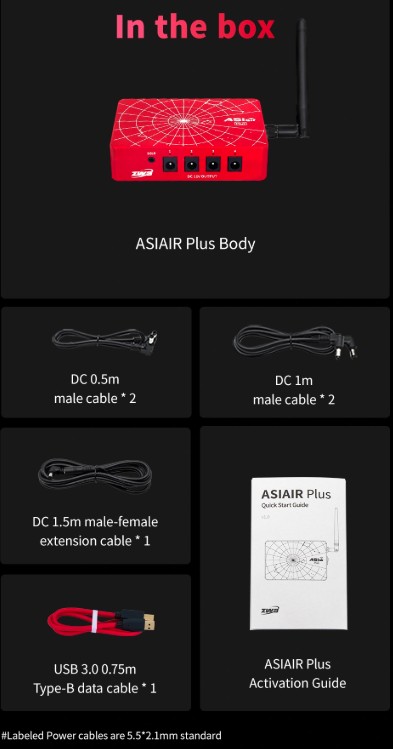
- ASIAIR Plus Body
- 2x DC 0.5m Male Cable
- 2x DC 1m Male Cable
- DC 1.5m Male-Female Extension Cable
- USB 3.0 0.75m Type-B Data Cable
- Quick Start Guide Activation Guide (China)

- Wireless control of your telescope setup via phone or tablet
- Controls and powers compatible cameras, mounts, focusers, filter wheels, and more
- Fully automate your imaging sessions with advanced scheduling tools
- Handles polar alignment, plate solving, guiding, and autofocus
- 256GB high-speed internal storage
- Beginner-friendly interface with step-by-step instructions
- Requires 12V DC power supply (not included)
ZWO ASIAIR Plus: All-in-One Telescope Control
The ZWO ASIAIR Plus is a smart controller that simplifies astrophotography by wirelessly managing your entire telescope setup. Trusted by astrophotographers worldwide, it builds on previous ASIAIR models with the power to control ZWO cameras, ZWO electronic automatic focusers, ZWO guide cameras, ZWO filter wheels, compatible mounts, dew heaters, and more, right from your smartphone or tablet!
ZWO ASIAIR Plus Review & Tutorial
In this video, Agena Astro affiliate Peter Zelinka covers the key features and setup of the ZWO ASIAIR Plus.
ZWO ASIAIR Plus Highlights
Ultra-Portable & Compact
The ASIAIR Plus is incredibly compact and lightweight, measuring just 102 x 70 x 26.5 millimeters and weighing only 0.5 lb (228 grams). It’s 24% thinner and 13% lighter than the previous ASIAIR Pro, making it easier than ever to take it anywhere your telescope goes.
256GB Internal Storage
The ASIAIR Plus features 256GB of onboard eMMC storage, giving you plenty of space to save multiple nights of imaging before needing to offload data to your computer.
It also includes a built-in Recovery Mode that automatically detects faults and restores the system if the ASIAIR Plus ever fails to boot, keeping your images protected.
Strong WiFi Antenna
The upgraded WiFi antenna enables a strong connection from up to 65 feet away (20 meters). Image from the comfort of your home or car while your telescope captures the cosmos!
Ultimate Connectivity for Astrophotography
With multiple USB ports, a dedicated DSLR control port, and four 12V power outputs, the ASIAIR Plus lets you connect and control nearly every device in your imaging rig! From cameras and mounts to focusers, filter wheels, and dew heaters, using a single compact hub.
Advanced Control Made Easy
The ASIAIR Plus combines powerful automation with user-friendly controls, making astrophotography easier and more efficient. It handles complex tasks like polar alignment, plate solving, guiding, and autofocus with precision. This means you spend less time fiddling with gear and more time capturing the night sky!
Paired with the intuitive ASIAIR app (available for both iOS and Android), your phone or tablet becomes a full-featured control center. Firmware updates are easy, too—just tap to install right in the app. No cables or complicated downloads required.
When your imaging session is done, the ASIAIR Plus can automatically return your mount to its home position and power itself down—no need to stay up late babysitting your gear!
Monitor All Your Gear in Real Time
The ZWO ASIAIR Plus gives you real-time monitoring of your entire imaging setup. You can view live image downloads, check guiding performance, adjust focus, and control your mount, camera, filter wheel, and more! This allows you to catch issues fast and make adjustments on the fly. With the ASIAIR Plus, you will spend less time troubleshooting and more time capturing data.
Plan Your Shots with the Built-In Sky Atlas
The ASIAIR Plus includes a powerful sky atlas—an interactive, real-time star map that displays what’s visible in the night sky from your location. It overlays your telescope and camera’s field of view directly onto the map, allowing you to preview your framing before moving your scope. It takes the guesswork out of framing, so you can plan and capture better-aligned, better-framed shots every time.
Behind the sky atlas is a fully searchable object database, packed with celestial catalogs including the Messier, NGC, and Sharpless objects. You can filter targets by catalog, object type, or pick from a list of the best objects visible tonight based on your exact time and location. Once you’ve selected a target, simply tap “Go” and the ASIAIR will automatically slew and center your mount—no manual entry or guesswork needed.
Effortless Polar Alignment
he ZWO ASIAIR Plus makes polar alignment fast, easy, and accurate—even if you’ve never done it before. Using your main imaging camera, the app guides you through a step-by-step polar alignment process that caters to both the northern and southern hemispheres. No additional tools or polar scopes needed.
Here’s how it works: the ASIAIR Plus captures an image using your main camera and plate solves it to determine exactly where your telescope is pointing in the night sky based on the stars in that image. It then automatically rotates the mount’s right ascension (RA) axis by 60 degrees, takes a second image, and plate solves again. By comparing the two images, it accurately calculates your polar alignment error. Next, the app guides you step-by-step as you use your mount's altitude and azimuth bolts to adjust its position to achieve precise alignment.
You don’t even need a clear view of your celestial pole. The ASIAIR can polar align from up to 30 degrees away from the pole, making it ideal for obstructed backyards.
Integrated Autoguiding with Advanced Features
If you're used to PHD2, you'll feel right at home with the ASIAIR Plus. Its built-in guiding system includes many of the same powerful features, except built right into ZWO’s own ASIAIR app. You get a live mini guiding graph always visible on the main imaging screen, so you can monitor performance in real time while capturing data. Dithering between sub-exposures is fully automated, helping reduce noise and improve image quality.
For those who like to fine-tune their results, the ASIAIR lets you adjust advanced guiding parameters like RA and Dec aggression, calibration steps, and more.
Precise Focus with ZWO’s Electronic Automatic Focuser
If you own a ZWO Electronic Automatic Focuser (EAF), the ASIAIR Plus lets you fully automate focusing through the ASIAIR app. It works by moving the focuser in and out while capturing images to create a V-curve. This curve helps the ASIAIR calculate the sharpest focus point with pinpoint accuracy, so your telescope delivers crisp, clear images every time.
The app also lets you adjust advanced autofocus settings like micron step size and backlash compensation. This gives you full control over the focuser’s movement, allowing you to match your equipment perfectly. This level of control helps reduce focus hunting, which once again saves you time!
Note: The ASIAIR Plus currently supports only ZWO’s EAF units. It is not compatible with third-party autofocusers.
Intelligent Capturing Modes
The ZWO ASIAIR Plus offers four smart capture modes to simplify your astrophotography.
With Autorun and Plan, you simply set it up and let it run. Autorun completes a full imaging sequence with automatic filter changes and meridian flips, while Plan manages multiple targets in one night, handling slewing, focusing, guiding, and imaging all on its own.
Live mode stacks images in real time, and Video mode captures high-frame-rate clips with selectable regions of interest for planetary and lunar imaging. The ASIAIR app makes capturing stunning astrophotography effortless, giving you more time to enjoy the night sky.
Frequently Asked Questions About the ASIAIR Plus
How do you power the ASIAIR Plus?
The ZWO ASIAIR Plus requires a 12V DC power supply with a 5.5x2.1mm male plug, capable of providing between 2A and 5A. ZWO recommends using a power source rated between 11V and 15V at 2A–5A. For safety, the device won’t power on if the voltage drops below 9V or exceeds 15V.
You can use ZWO’s AC adapter (sold separately) or your own compatible DC power supply. The ASIAIR Plus includes 5.5x2.1mm male cables for easy connection to sources like cigarette lighter adapters or field battery packs.
What is the WiFi range on the ASIAIR Plus?
Thanks to its upgraded external WiFi antenna, the ASIAIR Plus can maintain a stable wireless connection up to about 60 feet (20 meters). This improvement lets you comfortably control your astrophotography setup from your tent or car, though actual range may vary depending on your environment.
What are the options for built-in and external data storage?
The ASIAIR Plus includes 256GB of internal eMMC storage—enough for most imaging sessions without extra drives. About 12GB is used by the system and its Sky Atlas, leaving plenty of room for your photos. You can transfer images to your computer using a USB-C to USB-A cable (USB-C to USB-C cables aren’t supported).
If you need more storage, you can also use external USB flash drives or hard drives up to 1TB (512GB recommended), formatted as NTFS, FAT32, or exFAT.
How do you export images from the ASIAIR Plus to your computer?
The easiest way is to connect the ASIAIR Plus directly to your computer with a USB-C to USB-A cable—it will appear as an external drive for simple file drag-and-drop. Other options include using a USB flash drive or enabling Station Mode to transfer files over WiFi (though this is slower).
Does the ASIAIR app run on Mac or PC?
Owners of M1 and M2 Macs can now run the ASIAIR app natively from the App Store, though it’s not officially verified for macOS yet. Older Intel Macs need Android emulators like Bluestacks, which are unsupported and may be unstable.
On Windows PCs, you’ll also need an Android emulator like Bluestacks to run the ASIAIR app, but this method isn’t officially supported and may not work perfectly.
How do you attach the ASIAIR Plus to your telescope or mount?
The ASIAIR Plus includes a synta-style finder shoe-style mount that slides into your telescope’s finder shoe port for easy attachment. You can also mount it using longer 1/4"-20 screws (sold separately) on your dovetail bar or plate. Some users prefer using Velcro or hook-and-loop straps to secure it to their mount or dovetail plate for extra flexibility.
| Free Shipping Graphic | Free US Shipping |
|---|---|
| Hide Found a better Shipped Price on Frontend? | No |
- ASIAIR Plus Body
- 2x DC 0.5m Male Cable
- 2x DC 1m Male Cable
- DC 1.5m Male-Female Extension Cable
- USB 3.0 0.75m Type-B Data Cable
- Quick Start Guide Activation Guide (China)

ZWO ASIAIR Plus 256GB Wi-Fi Smart Camera Controller # ASIAIR-Plus-256GB